How MoneyWise works

From bank statement to financial insight

A straightforward process for turning supported bank statements into an organised view of your finances.

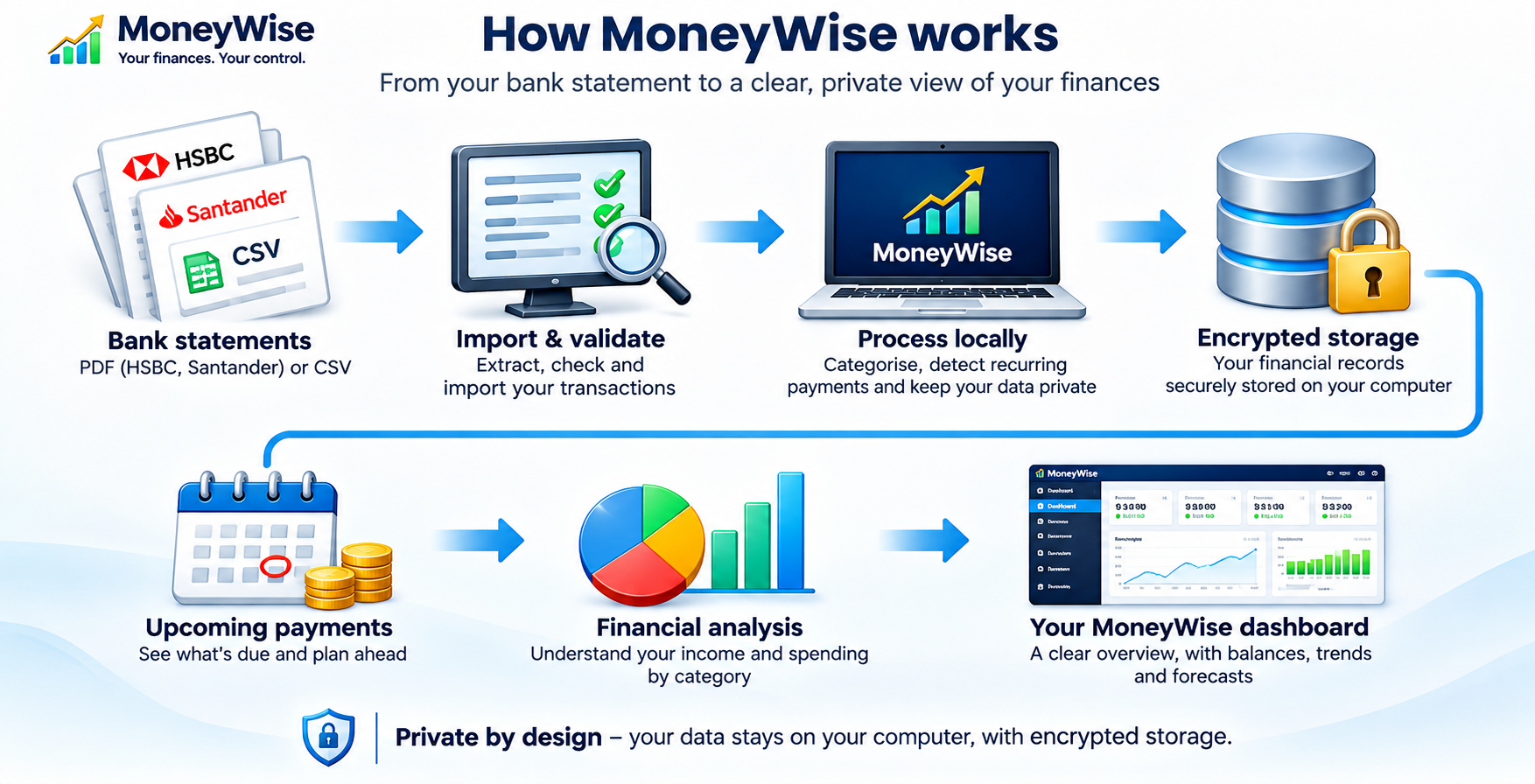
MoneyWise workflow showing the steps from importing bank statements through validation, local storage and analysis to financial forecasting
MoneyWise statement import and financial planning workflow.

Your financial data stays on your computer. Encrypted storage is being verified ahead of release.

You can reopen retained PDF statements to check the original document. Duplicate checks and balance reconciliation help identify potential import issues. Availability and accuracy of bank-specific imports remain subject to release testing.

Personal finance for Windows

A clearer view of your money.

Import supported bank statements with ease, keep your financial records private and on your own computer, and turn everyday transactions into clear insights about income, spending and future commitments.

Simple to use, designed for privacy

Import. Understand. Plan.

MoneyWise helps turn statements into a useful picture of your finances, without requiring you to connect your bank account to an online service.

Import statements with less effort

Select a supported PDF or CSV statement, review extracted transactions and retain access to imported PDFs from within MoneyWise. Reopen an original statement to check a transaction or balance. Duplicate checks and reconciliation help flag potential issues. HSBC UK and Santander UK PDF adapters are undergoing full acceptance testing.

Your data stays on your computer

Statement processing and financial analysis are designed to run locally on Windows. The website does not collect bank statements and MoneyWise does not need live bank connections. Encrypted storage and recovery are release requirements still undergoing verification.

Make sense of your finances

Explore income versus expenditure, spending by category, recent transactions, recurring payments and upcoming commitments. Use available history to estimate future balances, with forecasts clearly treated as estimates.

Inside MoneyWise

Your financial overview in one place

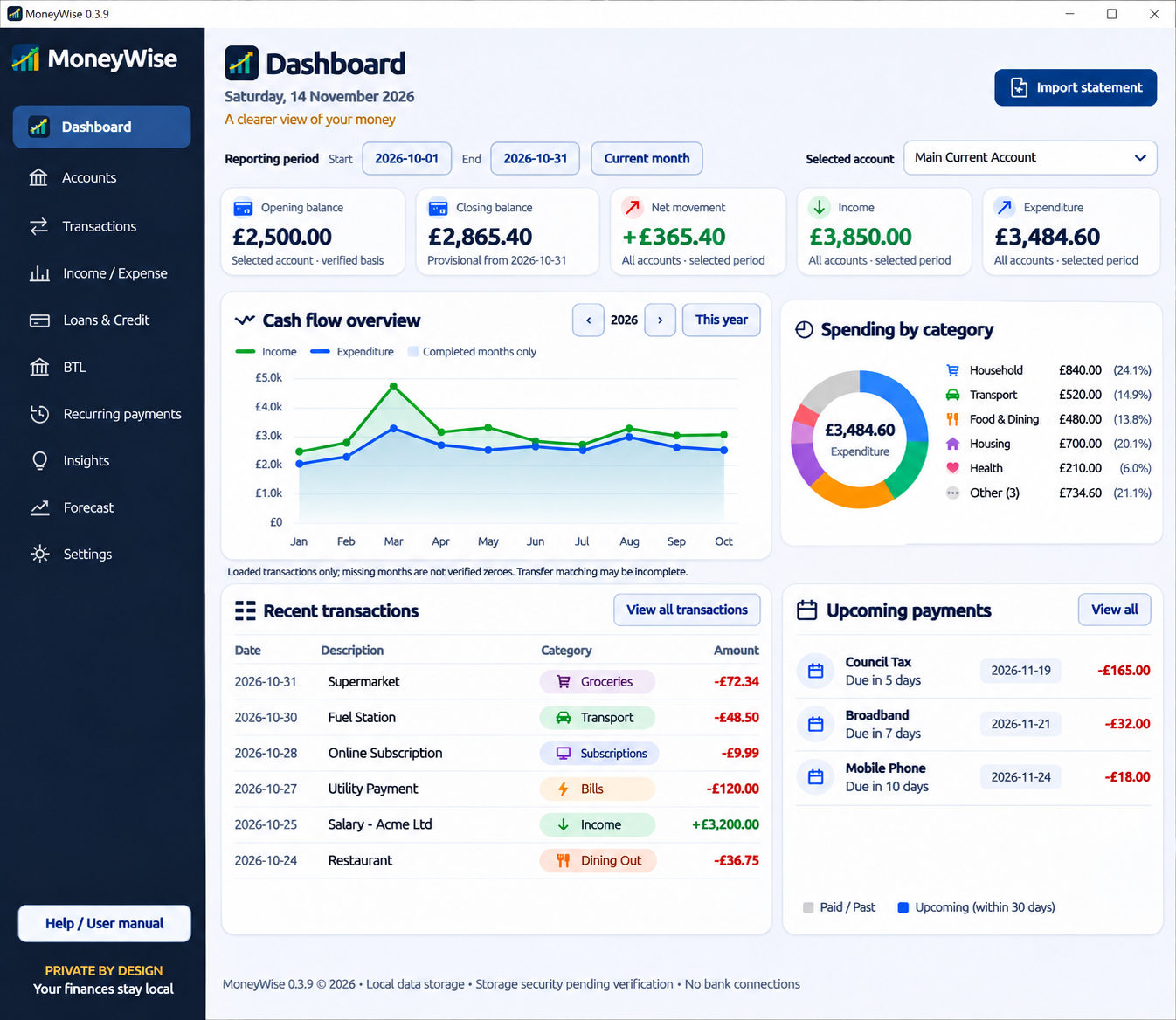
Explore the dashboard layout, including account summaries, spending categories, cash-flow charts and upcoming payments.

MoneyWise desktop dashboard showing financial overview, spending analysis, recent transactions and upcoming payments
MoneyWise 0.3.9 dashboard, demonstration preview. Features and security controls remain subject to release verification.
What MoneyWise is building

A clearer view of your money

MoneyWise brings statement imports, transaction organisation and planning tools into a single desktop application. Features are subject to release verification.

Statement imports

Import and review supported bank statements. HSBC UK and Santander UK have dedicated PDF transaction parsers in development. Import acceptance remains subject to statement-layout, reconciliation and Windows integration checks.

Spending categories

Review spending by category and month, assign categories and refine transaction organisation as you review imported history.

Forecasting

Estimate upcoming commitments and balances around your payday using available transaction history. Forecasts depend on complete and accurate imports.

Financial overview

Review account summaries, recent transactions, financial overview and provisional insights from imported records.

Recurring payments

Review detected recurring payments and anticipated commitments, including a month-based upcoming payments view.

Local-first design

Process statements locally on Windows without connecting directly to your bank. Secure storage and recovery remain release-gated.

Income and expenditure reports

Review the previous completed calendar quarter across imported accounts, with monthly totals, spending categories and transfer disclosures. PDF and Word-compatible .doc exports are in development; .doc is not native .docx.

Import safeguards

Statement preview, duplicate checks and integer-pence reconciliation in bank adapters help identify inconsistent imports. Complete end-to-end acceptance remains outstanding.

Bank format coverage

HSBC UK and Santander UK have implemented parser adapters. Sixteen additional bank identities are recognised but their PDF imports remain disabled pending representative fixtures and verification.
Security and privacy

Designed around local control

MoneyWise is designed for local processing without live bank connections. Normal development builds currently use unencrypted SQLite. Compatible encrypted storage, portable recovery, backup restoration and installer security must pass release verification before public distribution.

Development notice

MoneyWise is not yet approved for use with real financial information. Development builds and unverified installers must be used with synthetic test data only. Do not upload statements to this website.

Windows download

Public release coming after verification

MoneyWise for Windows

The installer will be made available here only after bank parser and import regression testing, encrypted storage verification, backup and recovery tests, and clean-machine installation checks have passed.

Download not yet available

We will publish the release version, system requirements, checksums and release notes alongside the installer.

About the project

Built for everyday financial clarity

MoneyWise is a Windows-first desktop application built with modern C++, Qt and a local database. The public website provides product information only; it does not accept bank statements or connect to your accounts.